Pages

Showing posts with label APPLICATIONS. Show all posts

Thursday, 1 May 2014

WORLD'S HARDEST GAME


Have you played world hardest game ?
If no then here is the link the game named also named the same "World's hardest game" which is available in play store.

Monday, 28 April 2014

5 GENERAL APPS YOU SHOULD INSTALL IN YOUR ANDROID (APP-5)

General Apps are those which full-fill our basic needs. after doing lot of research  we came with a list of five apps of very basic general category which everyone do with his smartphone i.e. "Audio, Video, Internet, File Manager, Sharing App " only one app from each category which you can install in your android. Today We are going to tell you an app for sharing applications & games.
Let's suppose you went to meet a friend & you saw some games,or any app which you like very much and wants that you should have that App or also may happen that your friend like some of your phone App.
Now what you going to do.Rather then note down the name of app & then download through  internet better to have a sharing app.
The App through which you can do this is Share Apps. Share Apps has a very clean interface through which you can send apps.The Share apps came with ads free and with ads version with same functionality so it's up-to you which one you prefer.
Also if you are going to format your phone you can make a back of the apps which can further installed back to your phone.

The brief description about app is given below


Description

Applications which are downloaded and installed from the Google application store can be shared with friends and family. This "apkshare" application allows you to take backup of your application on the internal storage or memory card.
Also you have the option to share the application installer with other people. By using the share option, you can send the apk file for an application to anyone by using messaging, email or blue-tooth.
As soon as you install a new application on your android device, this apk sharing application will detect the same and will allow you to share or backup the installed application with anyone.
Other features:
1) Option to backup all applications in single go
2) Bulk application apk file backup
3) Bulk application sharing with other people as attachment
Share Apps will share you app(include system app) to:
Email,
Dropbox,
Google Drive,
Bluetooth,
Facebook
etc.
Share Apps show your applications with a list, you can get a installation package directly from your memory and send it to your friends as a attachment
,what's more,It also can share the market links to your friends. This is a great way to get friends with new android smartphones started.
In addition to the ability to share a list of apps, you may also use those feature(By long click):
* Uninstall application
* Open application
* Show in Market
* Show Applications's detail or move to sdcard
One another use of this application is to move the application to memory card easily.

Play Store Link


Sunday, 27 April 2014

5 GENERAL APPS YOU SHOULD INSTALL IN YOUR ANDROID (APP-4)

General Apps are those which full-fill our basic needs. after doing lot of research  we came with a list of five apps of very basic general category which everyone do with his smartphone i.e. "Audio ,Video ,Internet, File Manager, Video Download" only one app from each category which you can install in your android. Today We are going to tell you a File Explorer app.

File Exploring is very basic and essential app of smartphone as it also helps us to manage the content in our smartphone as now smartphone are coming with higher and higher memory capacity and we are storing lot of contents inside it so it is very essential to manage it properly.
The file explorer must have desktop like tools which should helps us to manage our data. Desktop like performance is required as now phones are coming with huge space even more then 100 Gigs
so we just explored a number of file explorers and found one having all tools which helps us to manage our data more efficiently.
The app whom we are talking about is ANDROZIP the app is very simple yet very powerful
The andro-zip comes in free and paid version while ads is only difference between them
For Brief details just see below


#1 ZIP application and first Android archiver is with you since beginning of 2009. AndroZip File Manager helps you copy, delete, move, unzip/unpack, compress, encrypted ZIP supported, search, and organize your files, music, pictures, and folders just like you would do on your PC. Frequently updated with new and useful features. Optimized for tablets.
With over 13 million downloads and its support of ZIP, encrypted ZIP, RAR, TAR, GZIP and BZIP2. AndroZip File Manager is definitive leader among similar applications on the market.
Full support for decompression of encrypted ZIP files (Standard, AES-128 and AES 256 bit) compatible with WinRaR and other PC archivers as well as compression of encrypted ZIP files. AndroZip supports Standard ZIP file encryption compatible with WinRaR and other PC archivers (AES 128 and AES 256 bit encryption available in paid version)
Besides the archive functionality it also lets you send files, e.g. via email.
Optimized specifically for both, phone and tablet displays. Due to many added features like drag and drop functionality, AndroZip File Manager is preferred among tablet users.
Use it also to back up your applications and install new application APK on your phone, and manage phone memory and resources via task manager.
Installs to SD card.
********************************
What others say about AndroZip
"AndroZip comes to the rescue, providing a file explorer, task manager, archive manager, app backup tool, and more, all within a simple and intuitive interface." (PCWorld, MacWorld and Washington Post had same review)
“Of all the file managers I have tried for the Android platform, the one that stands heads above the rest is the free AndroZip File Manager...“(Jack Wallen, TechRepublic)
“Just like winzip or winrar” (Eric, AndroZip user)
**************************
Permissions:
- INTERNET is used only to get Google AdMob ads (in paid version AndroZip is not using INTERNET permission)
- WRITE EXTERNAL STORAGE is used to copy, move, delete, zip, unzip, unrar … files on SD card (necessary for file management)
- GET TASKS is used to see processes on your device (used in task manager part of AndroZip)
- WAKE LOCK is used to keep AndroZip "alive" while for example copying, unpacking, packing large files
- RESTART PACKAGES is used to allow user of AndroZip to kill background processes
File manager with multiple/batch delete, move, copy, create ZIP
Task killer, application manager
Install apps: APK files
Short tap and long tap menus

Download 

Saturday, 26 April 2014

5 GENERAL APPS YOU SHOULD INSTALL IN YOUR ANDROID (APP-3)

General Apps are those which full-fill our basic needs. after doing lot of research  we came with a list of five apps of very basic general category which everyone do with his smartphone i.e. "Audio ,Video , Internet, File Manager, Video Download" only one app from each category which you can install in your android. Today We are going to tell you an Internet browser app


I don't think so it is very difficult to guess if we talk about the best internet browser apk available.
The Google's Chrome yes Google chrome has done just like android (slowly changes it's position and beat rest of mobile OS)
Google Chrome has changed it's rank in both PC and android phones with support of  huge marketing internet ads.
Not only marketing but yes really chrome experience in real  time also got improved too much.
Chrome was able to beat it's main rival in mobile internet browser app Opera Mini/Opera mobile. But still for feature phone Opera works best. but here we are talking about Smartphones only where Chrome now Became the king of browsers.
The Chrome comes with various good day to day use features like Auto-fill forms,Search engine selection,Password save option etc.
The Chrome also comes with Reduce data usage option which compress pages through Google servers just like page compression option in opera mini.Still exception is there it will not compress secure sites page (SSL) like bank sites etc.
The best feature that chrome offer is automatic Google translate which removes the language barrier between the website.
Moreover the page load time in Google Chrome is near about half as compared to stock android browser.
also Google chrome has proven himself one of the best in several Synthetic Browser bench-marking test like Sun-Spider, Browser-mark 2 by beating it's rival like Firefox,UC Browser,Dolphin,Boat, etc.
Alternatively you can see dolphin browser as it come with several ad ons and customization but if we see the best browser which full-fill the basic needs then Chrome is best.
Browser Description in Brief (As in Play Store) is given below.

Browse fast on your Android phone and tablet with the Google Chrome browser that you love on desktop. Pick up where you left off on your other devices with tab sync, search by voice and save up to 50% of data usage while browsing.

• Sync Across Devices – seamlessly access and open tabs and bookmarks from your laptop, phone or tablet
• Save Data – reduce mobile data usage by up to 50% while browsing
• Faster Browsing – choose from search results that instantly appear as you type and quickly access previously visited pages
• Voice Search – use the magic of Google voice search to find answers on-the-go without typing
• Translate – easily read webpages in any language
• Intuitive Gestures – open as many tabs as your heart desires and quickly flip through them by swiping from side to side on the toolbar
• Privacy – use Incognito mode to browse without saving your history

Download


Friday, 25 April 2014

5 GENERAL APPS YOU SHOULD INSTALL IN YOUR ANDROID (APP-2)

General Apps are those which full-fill our basic needs. after doing lot of research  we came with a list of five apps of very basic general category which everyone do with his smartphone i.e. "Audio ,Video , Internet, File Manager, Video Download" only one app from each category which you can install in your android.

Today We are going to tell you a video app 

Now lets talk about video app when we buy a  new phone what generally happens it only support mp4 and 3gp format rest of the formats are not support by the default player (seems like window media player of windows support only few formats).
For that we  have done a lot of research and finally concluded to Mx player as best video player also this is the one of the earliest player since android launch and available for all versions after which support all formats that we play in PC.
Also there is pinch to zoom feature which enable use to view zoom in and out video.
The MX -Player is available for Android 2.1+


Description
MX Player - The best way to enjoy your movies.
a) HARDWARE ACCELERATION - Hardware acceleration can be applied to more videos with the help of new H/W decoder.
b) MULTI-CORE DECODING - MX Player is the first Android video player which supports multi-core decoding. Test result proved that dual-core device’s performance is up to 70% better than single-core devices.
c) PINCH TO ZOOM, ZOOM AND PAN - Easily zoom in and out by pinching and swiping across the screen. Zoom and Pan is also available by option.
d) SUBTITLE GESTURES - Scroll forward/backward to move to next/previous text, Up/down to move text up and down, Zoom in/out to change text size.
e) KIDS LOCK - Keep your kids entertained without having to worry that they can make calls or touch other apps. (plugin required)


Subtitle formats:
- DVD, DVB, SSA/ASS Subtitle tracks.
- SubStation Alpha(.ssa/.ass) with full styling.
- SAMI(.smi) with ruby tag support.
- SubRip(.srt)
- MicroDVD(.sub/.txt)
- SubViewer2.0(.sub)
- MPL2(.mpl/.txt)
- PowerDivX(.psb/.txt)
- TMPlayer(.txt)

The two version of this player is available in play store one is free version and another is paid 
the difference between both version are ads.

Wednesday, 23 April 2014

5 GENERAL APPS YOU SHOULD INSTALL IN YOUR ANDROID (APP-1)

General Apps are those which full-fill our basic needs. after doing lot of research  we came with a list of five apps of very basic general category which everyone do with his smartphone i.e. "Audio ,Video , Internet, File Manager, Video Download" only one app from each category which you can install in your android.

1. AUDIO
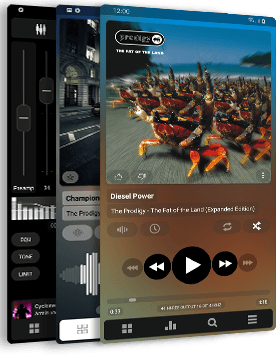
    POWERAMP PLAYER


    If you fade up with the performance of stock audio player of the phone and want some good bass in     your headphones then this app is for you we have tried several audio players but this app stands out in           terms of manipulation of music.
    The equalizer of this app is awesome we have seen best ever effective equalizer in smartphone 

 Key Features


  • plays mp3, mp4/m4a (including alac), ogg, wma*, flac, wav, ape, wv, tta, mpc, aiff (* some wma pro files may require NEON support)
  • 10 band optimized graphical equalizer for all supported formats, presets, custom presets
  • separate Bass and Treble adjustment
  • stereo eXpansion, 
  • mono mixing, balance
  • crossfade
  • gapless
  • replay gain
  • plays songs from folders and from own library
  • dynamic queue
  • embed and standalone .cue files support
  • support for m3u, m3u8, pls, wpl playlists
  • OpenGL based cover art animation
  • downloads missing album art
  • 4 configurable widget types
  • Visual themes, downloadable 3rd party skins available on Google Play
  • configurable lock screen with optional Direct Unlock
  • headset support, automatic Resume on headset and/or BT connection (can be disabled in settings)
  • tag editor
  • fast library scan
  • scrobbling
  • lyrics support, including lyrics search via musiXmatch plugin
  • high level of customization via settings
  • works on Android 2.1+, optimized for Android 2.3/Gingerbread, 3.0/Honeycomb, 4.0/ICS
  • localized into Chinese (Traditional and Simplified), German, Italian, Japanese, Korean, Polish, Russian, Spanish, Swedish
The player is available for US$ 3.99 but before that you can also download the trial version of this app which act as a full version for next 15 days 

 
Download 15 days Trial:


Buy Full Version Unlocker for US$ 3.99 (special prices available for China and India)*:

  QR CODE


We will come with another app in video category tomorrow